
How to Choose a Projector: 7 Things to Check Before You Buy
Confused about choosing a projector? Check room size, screen size, lighting, budget & more. Bhavya Innovation Raipur helps you pick the right one.
1. Size of room where you want to install the projector
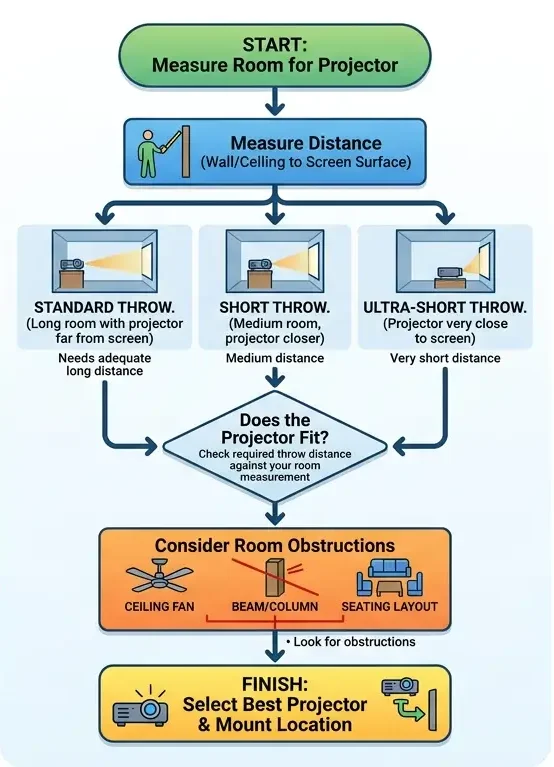
First, measure the distance from where the projector will be mounted or placed to the screen or wall surface, since this directly affects image quality.
- Additionally, make sure there’s enough space for the required throw distance — whether you choose a standard, short-throw, or ultra-short-throw projector.
- Furthermore, consider the ceiling height, ceiling type, and any obstructions like fans or beams that might block the projection path.
- Finally, factor in your seating layout, as the overall room layout plays a big role in deciding which type of projector will actually work best for your space.
2. Ideal Projector Screen Size
- Decide how large the projected image (diagonal) needs to be such that audience gets a clear vision.
- The larger the screen, the more brightness you’ll need (because light spreads over larger area)
- Make sure the projector’s throw ratio supports your space (distance vs width).
3. Ambient Light Conditions for Projectors
- If the room has lots of ambient light (windows, lights on), you will need a higher‐brightness projector.
- If you can dim lights or have controlled lighting, you can use a moderately bright projector.
- The surface you project on (screen quality, colour of wall) and wall/room colours will also affect visibility.
4. Type of Content: Movies, Gaming, or Presentations
- For primarily text, slides, diagrams: resolution and brightness matter, but ultra-high resolution may not be required.
- For multimedia, video, lots of visual detail: you’ll want higher resolution, good contrast, maybe a laser or long‐life light source.
5. Projector Budget: What to Expect at Every Price Range
- Set your budget first (including cost of installation, screen, mounting, possible replacement lamps, service).
- Higher budgets allow for better light sources (laser), higher brightness, more features, better resolution.
- Lower budgets will require trade-offs (smaller screen, less bright, maybe more ambient light control).
- Always match what you need (room, content, audience) rather than just buying the “top spec” irrespective of use.
6. Projector Resolution and Brightness (Lumens) Explained
Choose resolution and brightness based on your room size, screen size, and lighting conditions — not just the highest numbers available.
- Higher resolution (Full HD, 4K) gives sharper, more detailed images — especially important for larger screens or close viewing distances.
- Don’t just chase specs — a bright, low-resolution projector in a well-lit room often performs better than a dim, high-resolution one that looks washed out.
- Higher lumens (brightness) are essential if the room has windows or ambient light; dark, dedicated home theatre rooms can work well with lower lumens.
7. Projector Connectivity Options: HDMI, Wi-Fi & More
Check what devices you’ll actually connect — laptop, phone, streaming stick, gaming console — before finalizing your projector.
- HDMI is essential for most laptops, consoles, and streaming devices; make sure there are enough ports for all your gadgets.
- Wi-Fi and Bluetooth support add convenience for wireless streaming and audio, cutting down on cable clutter.
- USB and screen mirroring options are useful for quick presentations or sharing content directly from a phone without extra cables.