
Interactive Flat Panel generally come in 65”, 75”, 86”, and 98” sizes. Selecting the correct interactive flat panel size depends on room dimensions, the number of students, the type of teaching content, and the level of physical interaction with the board during live sessions.
1. Interactive Flat Panel Size Guide Based on Classroom Size :
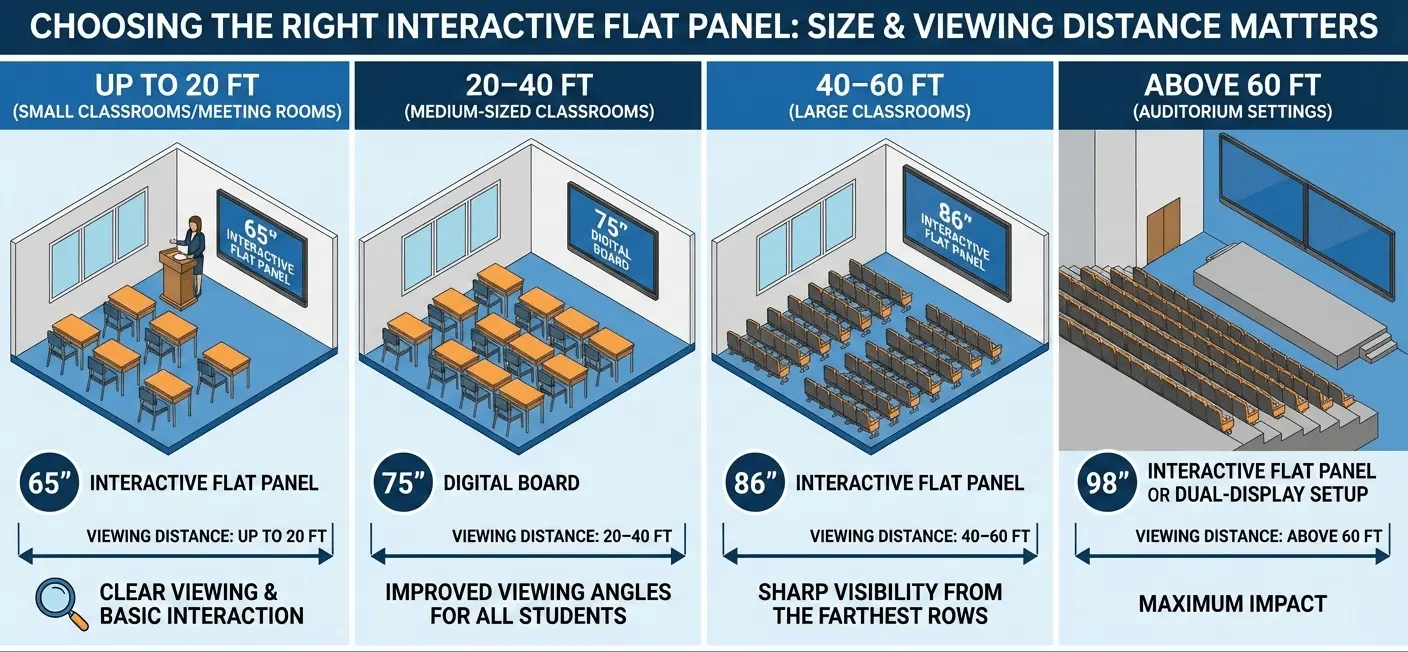
Choosing the right Interactive Flat Panel or digital board for smart classrooms depends largely on classroom size and viewing distance. Larger classrooms require bigger panels to ensure clear visibility, even from the back benches.
General size recommendations:
Up to 20 ft (small classrooms or meeting rooms):
A 65” Interactive Flat Panel is ideal for clear viewing and basic interaction.20–40 ft (medium-sized classrooms):
A 75” digital board provides improved viewing angles for all students.40–60 ft (large classrooms):
An 86” Interactive Flat Panel ensures sharp visibility from the farthest rows.Above 60 ft or auditorium settings:
A 98” Interactive Flat Panel or dual-display setup is recommended for maximum impact.
📌 Pro Tip: Always factor in viewing distance. Students seated at the farthest point should comfortably read 18–20 pt text without eye strain to ensure an effective smart classroom learning experience.
2. Interactive Flat Panel Size guide based on Audience Size (Number of Students)
The number of learners in a classroom plays an important role in choosing the right Interactive Flat Panel or digital board for smart classrooms. As the class size grows, students sit farther away, so a larger display becomes necessary for clear visibility and visual comfort.
Recommended panel sizes by class strength
First, for up to 30 students:
A 65” Interactive Flat Panel works well for small classrooms and training rooms.
Next, for 30–50 students:
A 75” digital board provides balanced screen coverage and improved viewing angles for everyone.
Then, for 50–75 students:
An 86” Interactive Flat Panel helps maintain clear visibility in larger classroom settings.
Finally, for above 75 students or lecture halls:
A 98” Interactive Flat Panel or a projection-linked setup is recommended.
In addition, installing an alternate or clone display can further improve visibility for all learners.
📌 Key Insight:
Overall, as classroom strength increases, viewing distance also increases. Therefore, choosing the correct smart classroom display size helps students read content comfortably without eye strain and supports an effective, engaging learning experience.
3. Interactive Flat Panel guideBased on the Requirement of Writing Space and Type of Content
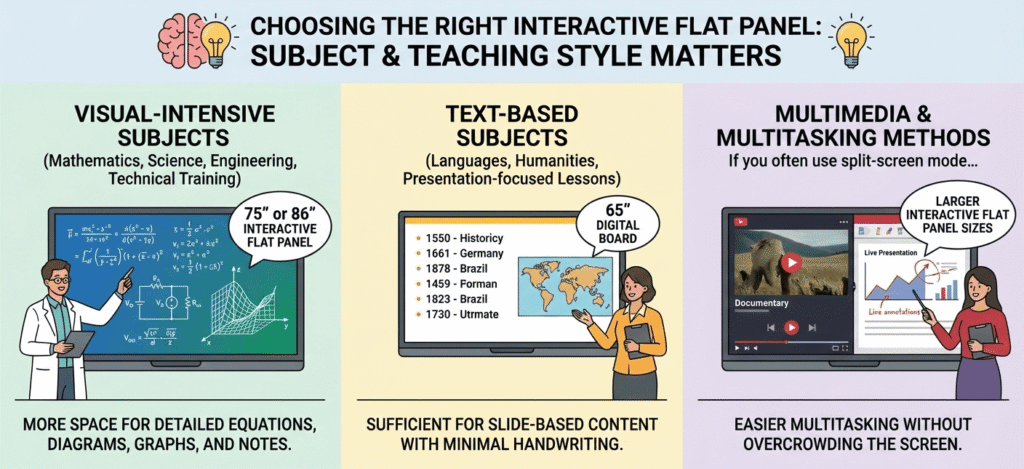
The required writing and drawing space on an Interactive Flat Panel or interactive digital board mainly depends on the subject being taught and the teacher’s teaching style. Because different subjects have different needs, the level of visual detail and screen interaction can vary.
Recommended panel sizes by subject type
First, for visual-intensive subjects such as mathematics, science, engineering, and technical training:
Larger displays like 75” or 86” Interactive Flat Panels offer more space for detailed equations, diagrams, graphs, and notes along with text.
Next, for text-based subjects such as languages, humanities, or presentation-focused lessons:
A 65” digital board for smart classrooms is usually enough when the content is mostly slide-based or requires very little handwriting.
Additionally, for multimedia and multitasking teaching methods:
If you often use split-screen mode for videos, presentations, and live notes, larger Interactive Flat Panel sizes make multitasking easier without overcrowding the screen.
📌 Teaching Tip:
Overall, choosing the right smart classroom display improves content clarity, increases interaction, and creates a more engaging learning experience for students.
4. Key Points to Remember While Selecting a Interactive Flat Panel for a Live Class
The ideal Interactive Flat Panel size should match the teacher’s body build, height, and movement style during teaching. When the size is right, lesson content stays clearly visible for students in physical classrooms as well as in hybrid or online learning environments.
Key visibility considerations
First, the interactive digital board should be large enough to show all important content without being blocked when the teacher stands in front of it.
Next, the teacher’s shoulder width and height should not cover key visuals for students sitting in the classroom or watching online.
Also, having enough screen space improves clarity during live demonstrations and recorded sessions.
Recommended panel sizes by teaching style and body reach
65” Interactive Flat Panel:
Generally, this size works best when only a small part of the lesson is taught on the panel. For example, it is suitable for online tutoring, stock analysis, astrology sessions, or content-focused presentations.
75” Interactive Flat Panel:
In most cases, this size offers the best balance between easy reach and clear visibility, making it ideal for most teachers and standard smart classroom setups.
86” and 98” Interactive Flat Panels:
On the other hand, these larger panels are better suited for teachers with a larger body build or for classrooms that need wider teaching movements and more board interaction.
📌 Hybrid Teaching Tip:
Finally, during live or recorded classes, always test visibility by standing beside and in front of the digital board for smart classrooms. This helps ensure that text, diagrams, and notes remain clear for both classroom learners and remote students.
Final Advice :
First, selecting the right Interactive Flat Panel or digital board for smart classrooms needs proper planning to ensure comfort, clear visibility, and effective teaching over the long term.
Before making a purchase, keep these best practices in mind:
Start by measuring your classroom accurately before choosing an Interactive Flat Panel size.
Next, think about the students sitting farthest away, not just the teacher’s comfort or position.
If possible, try to see a demo installation of the digital board in a classroom that is similar in size and layout.
Finally, choose a panel size that balances screen visibility, writing comfort, and easy teaching movement.
In the end, when you match the Interactive Flat Panel size with room dimensions, number of students, teaching content, and physical interaction, you create a smart classroom environment that improves engagement, clarity, and learning comfort for both teachers and students.
Click here to go HOME